

Ship Fixes Where You Ship Code: Sybil Now Integrates with GitHub Issues


We just made closing the gap between finding a bug and patching it a lot faster.
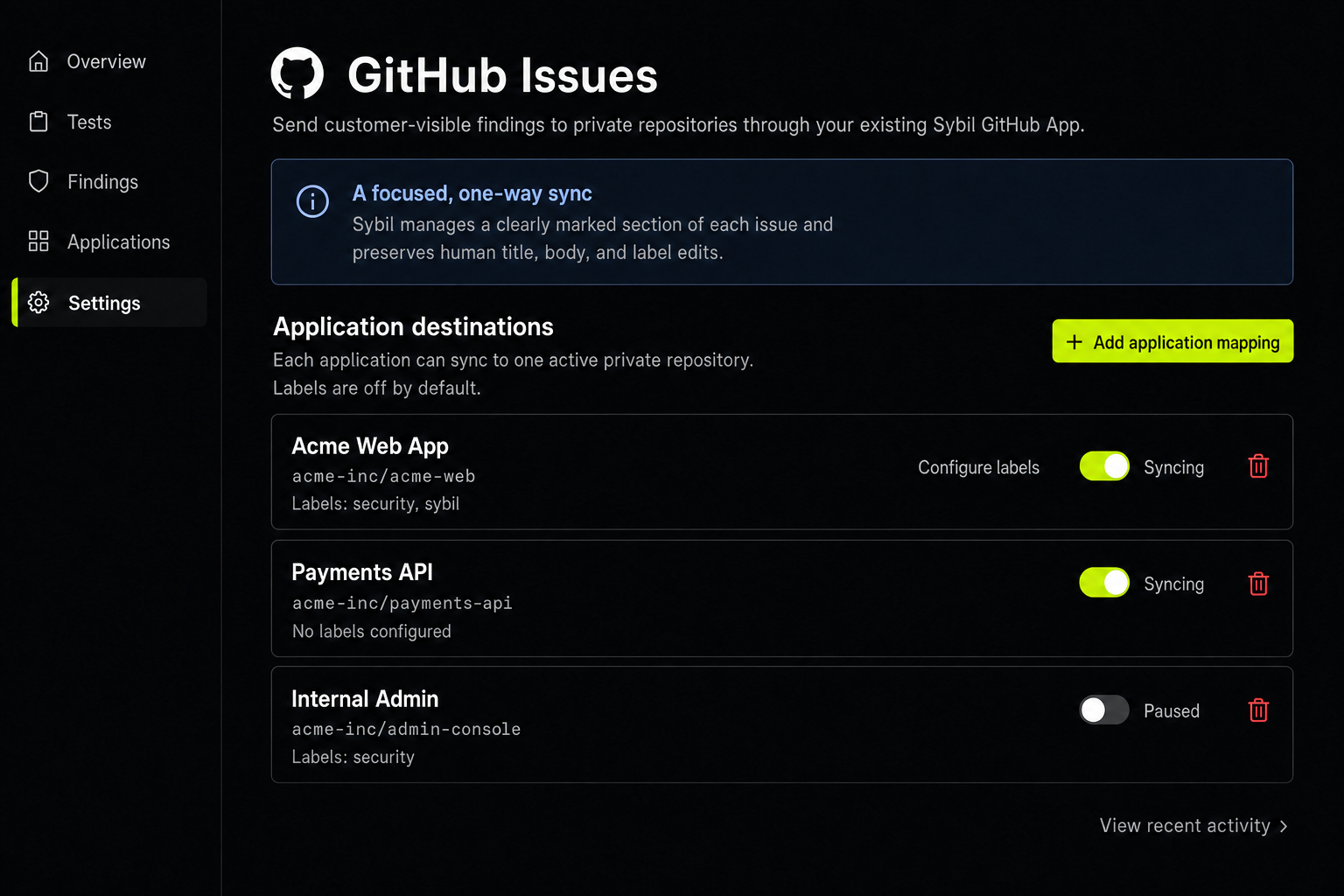
To meet engineers where they already build, Sybil now pushes validated findings straight into your private GitHub repositories as issues, updates them on every re-test, and keeps your engineers’ edits intact. Remediation work lands in the same repo as the code that needs fixing.
How It Works
Sybil automatically creates an issue as soon as a finding becomes visible. Each finding maps to exactly one issue. When Sybil re-tests and the vulnerability is still there, it updates that same issue rather than filing another one.
Setup lives under Settings → Integrations → GitHub Issues. It just takes two steps:
- Connect the Sybil GitHub App and grant it access to the private repositories you want to use.
- Map each Sybil application to one private repository. Labels are optional and off by default.
Every issue links back to the initial finding in Sybil, putting full evidence and step-by-step reproduction just one click away.
Sybil uses your repository's existing labels, supporting up to 20 per destination. It never creates or renames a label, so your triage automation keeps working.
What to Know About How Sync Works
This first version we’ve built is push-only, and we’ve been deliberately conservative about what Sybil touches in your repo:
- Sybil writes and maintains one marked section of the issue body. Everything outside of that block, including the title and any labels a human adds, belongs to your team.
- Closing or editing the issue in GitHub does not change the finding in Sybil. A finding closes only when a re-test confirms the fix.
- If a finding is changed to “won’t fix” in the Sybil platform, Sybil adds a notice to the issue instead of closing it. Your team decides what happens to the ticket.
- Destinations are private repositories only. Public, archived, or disabled repositories are not eligible, and if a repository leaves the app’s access list, Sybil pauses that destination instead of failing quietly.
- The activity log in integration settings shows you every issue created and the finding that triggered it.
Why We Built This
You asked, we delivered: findings now link straight to the tools your engineers use every day. Copy-pasting a vulnerability out of one system and into another is how fixes stall. The problem is when the finding loses its evidence, its owner, and its urgency somewhere in the mix. Sybil already reads your repository for change testing. Filing the fix in that same repository is the fastest path from initial discovery to a deployed patch.
What’s Coming
We're bringing this same experience to Jira next: connect, choose your destination, and map once. For everything else we shipped this month, see the monthly changelog.
Try it
If you’re already a RunSybil customer, connect GitHub under Settings → Integrations. If you’re evaluating RunSybil and tracker integration is on your checklist, you can schedule a demo.




Subscribe to RunSybil Blog
A weekly newsletter covering stories, techniques, guides and the latest product innovations coming.