

Changelog: October 2026

html<table style="border-collapse: collapse; font-size: 13px; width: 100%; margin: 0 auto;">
  <thead>
    <tr>
      <th style="border: 1px solid black; padding: 4px 6px;"></th>
      <th style="border: 1px solid black; padding: 4px 6px;">Delta TPs</th>
      <th style="border: 1px solid black; padding: 4px 6px;">Full TPs</th>
      <th style="border: 1px solid black; padding: 4px 6px;">Total TPs</th>
      <th style="border: 1px solid black; padding: 4px 6px;">Likely FPs</th>
      <th style="border: 1px solid black; padding: 4px 6px;">Likely FP Rate</th>
    </tr>
  </thead>
  <tbody>
    <tr>
      <td style="border: 1px solid black; padding: 4px 6px;">Claude<br>Code</td>
      <td style="border: 1px solid black; padding: 4px 6px;">44 / 46<br>(95.7%)</td>
      <td style="border: 1px solid black; padding: 4px 6px;">19 / 50<br>(38.0%)</td>
      <td style="border: 1px solid black; padding: 4px 6px;">62 / 95<br>(65.3%)</td>
      <td style="border: 1px solid black; padding: 4px 6px;">48</td>
      <td style="border: 1px solid black; padding: 4px 6px;">43.6%</td>
    </tr>
    <tr>
      <td style="border: 1px solid black; padding: 4px 6px;">Codex<br>(GPT-5.5)</td>
      <td style="border: 1px solid black; padding: 4px 6px;">43 / 45<br>(95.6%)</td>
      <td style="border: 1px solid black; padding: 4px 6px;">30 / 50<br>(60.0%)</td>
      <td style="border: 1px solid black; padding: 4px 6px;">74 / 95<br>(77.9%)</td>
      <td style="border: 1px solid black; padding: 4px 6px;">629</td>
      <td style="border: 1px solid black; padding: 4px 6px;">89.5%</td>
    </tr>
  </tbody>
</table>
<p style="font-size: 12px; font-style: italic; margin-top: 8px;">Table 2: True positive (TP) and false positive (FP) analysis of Claude and Codex across challenge types.</p>
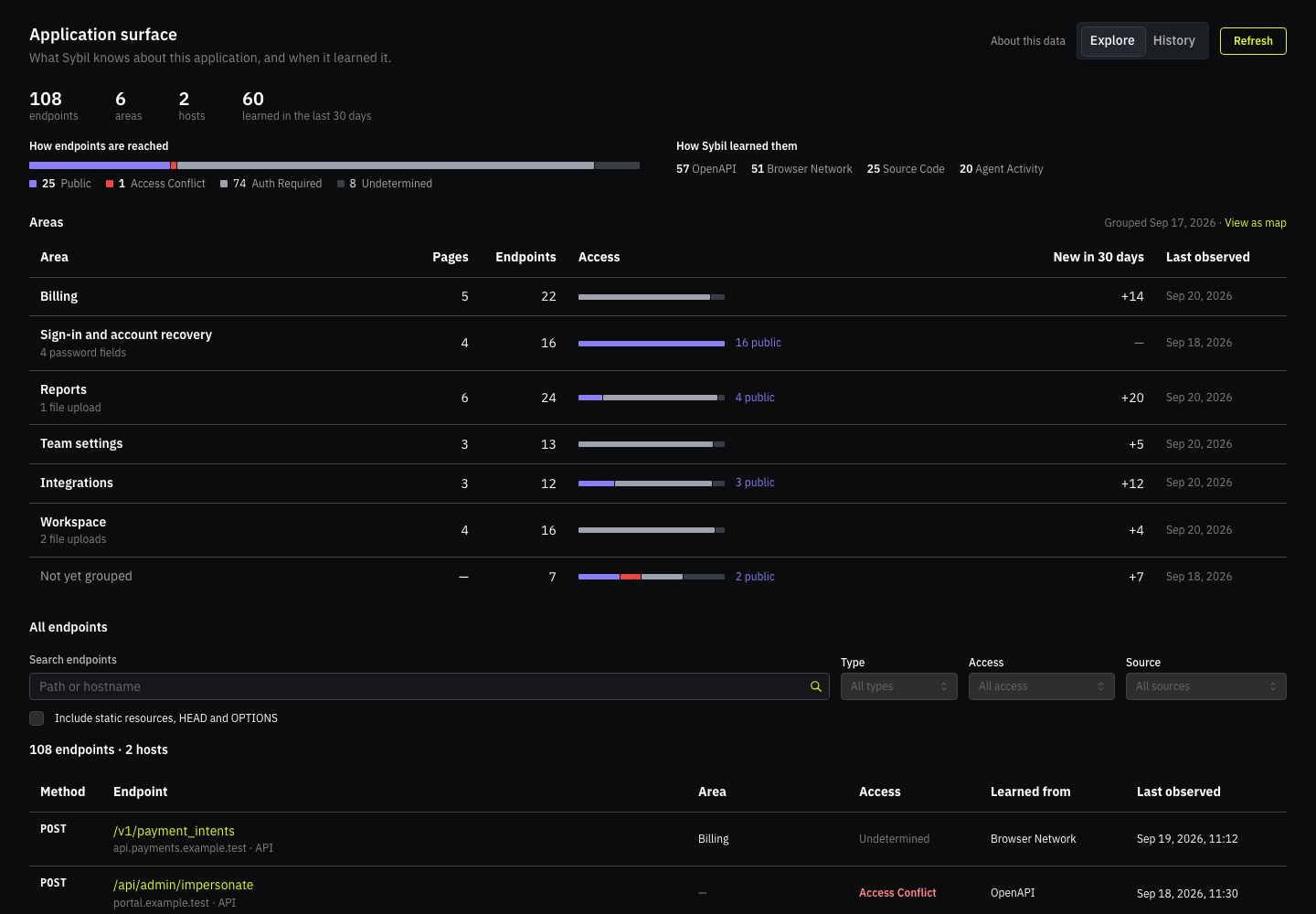
Get Full Visibility into Your Application's Attack Surface
Track every endpoint Sybil sees across your entire stack. With the new surface view, you can map application areas, trace reachability and discovery paths, and flag endpoints detected in the last 30 days. Search and filter the catalog to inspect any target in seconds.
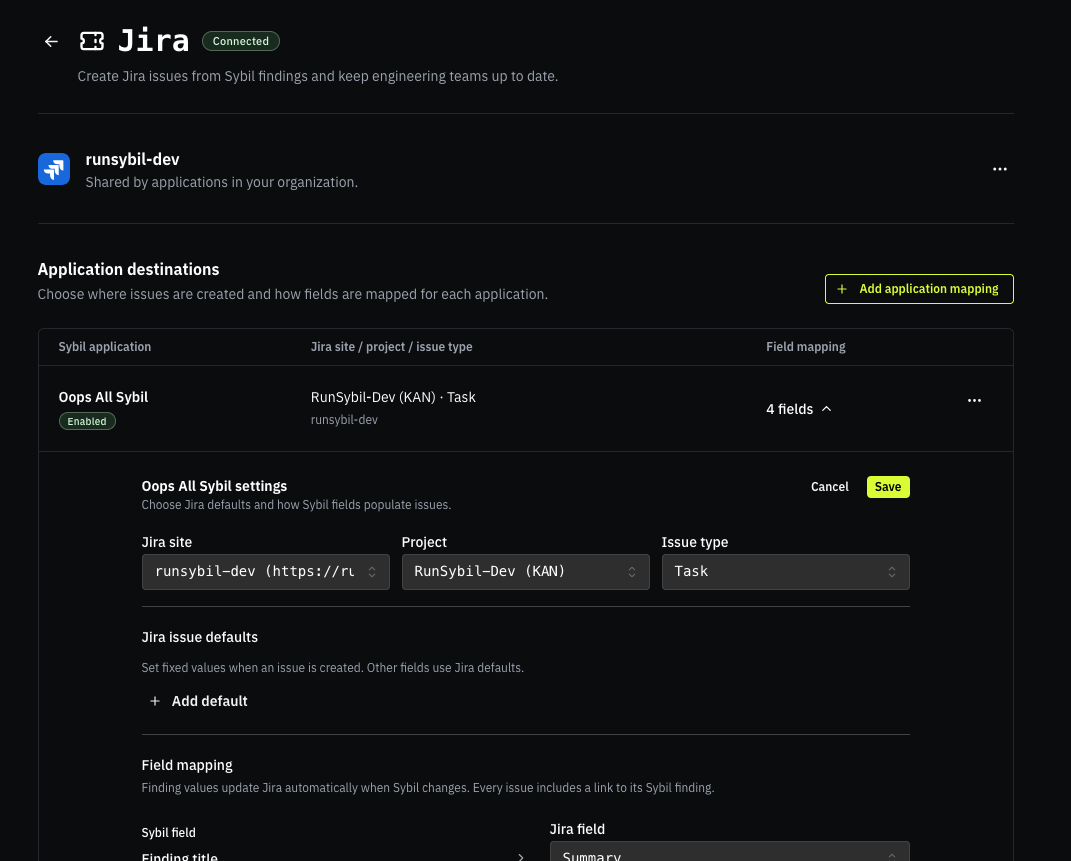
Push Vulnerability Findings to Jira Through Our New Integration
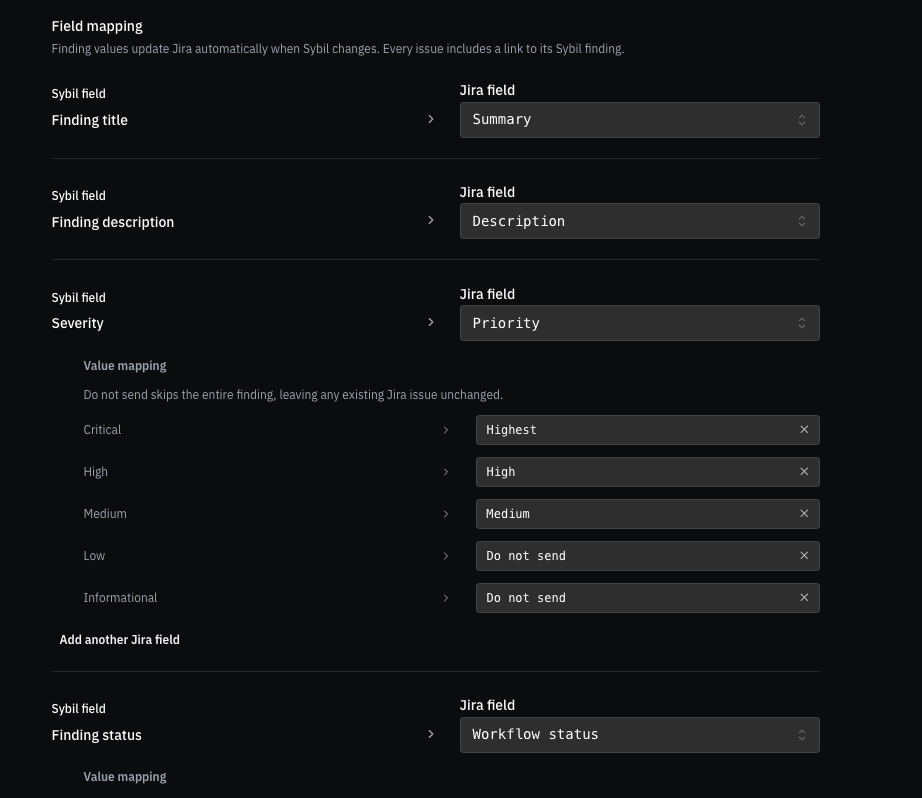
Following our recent ticketing integrations for Linear and GitHub, we’ve added full Jira support. This allows teams to receive findings directly in their existing workflow without stepping into the RunSybil UI.
When findings are rediscovered on subsequent tests, they update existing tickets accordingly, keeping noise at a minimum for remediation teams.
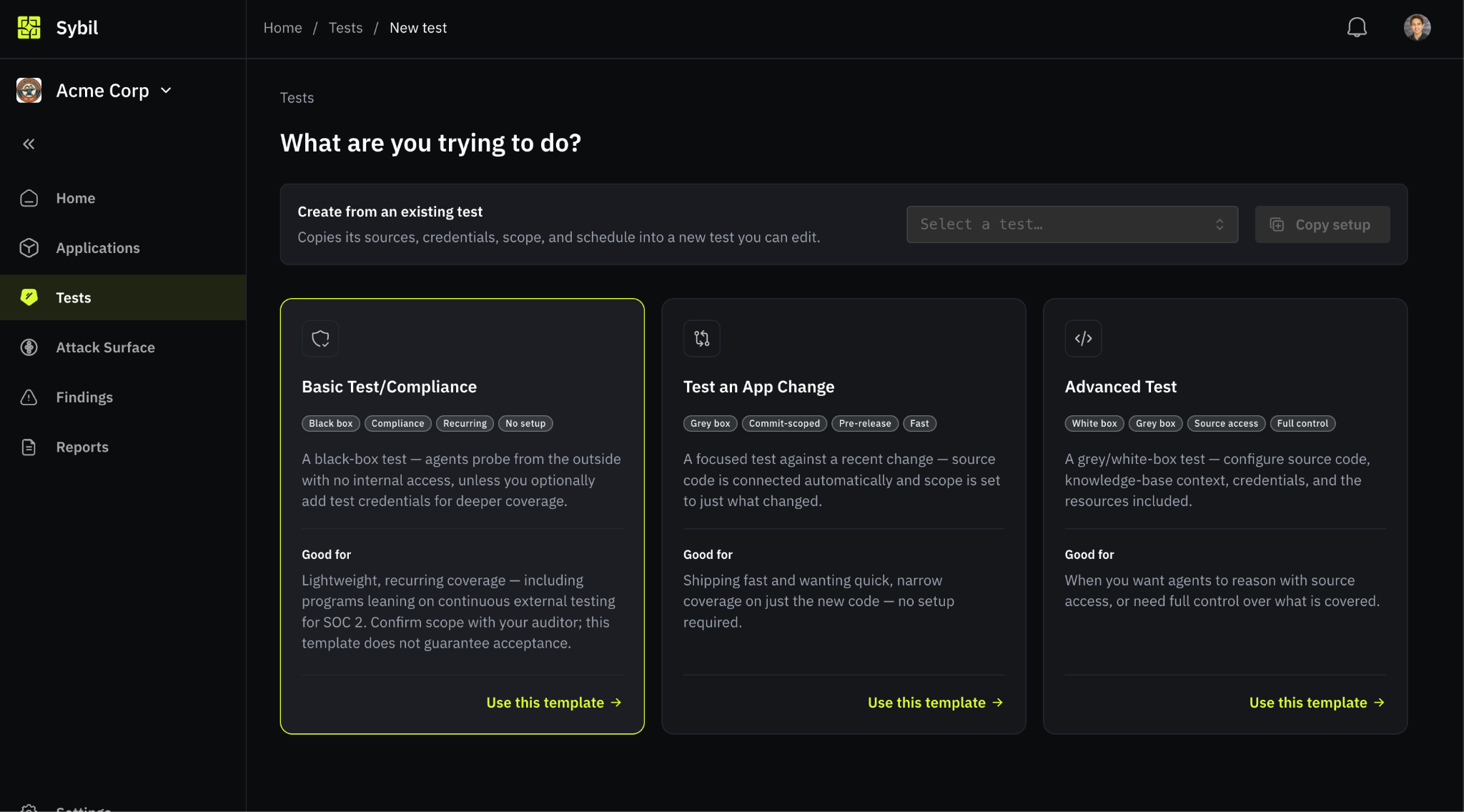
Launch The Right Test For The Job
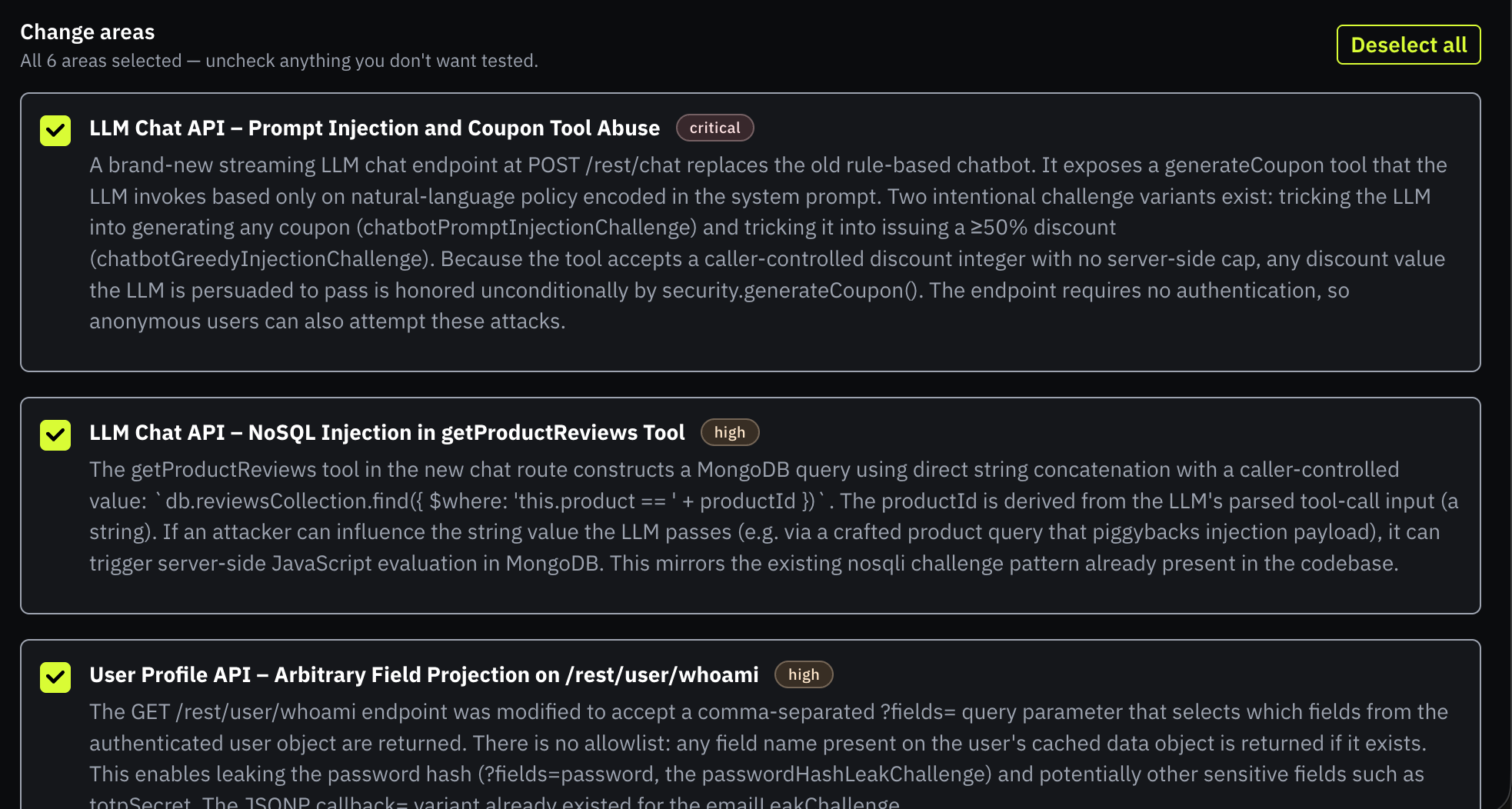
We’ve redone the test creation experience to be quick and intuitive, stripping away unnecessary complexity. Choose a Basic, Change, or Advanced template. Then review the scope and resources before launch. Schedule it for one run, or set a recurring cadence.
More Updates and Enhancements
- Notification Inbox: The notification bell now shows a centralized inbox with unread counts and controls to mark notifications read or unread.
- Finding Status History: Finding history now shows status changes, closures, and reopenings, making it easier to follow remediation and retest outcomes.
- Pre-test Readiness Checks: Through the platform, you can run key tests, like making sure your application is accessible and that credentials work, before the test launches.
- See Remaining Tests: The toolbar shows how many tests your organization has left, with a breakdown of completed and remaining tests for clarity.
- Attack Fronts Export: Export a complete audit log of HTTP requests made during a test, making compliance reviews and test validation easier.
- Notion Knowledge Base Integration: Connect Notion to Sybil to give agents additional application context during pentesting.
Coming Up on Our Roadmap
- Knowledge Base Integrations: We are continuing to evaluate knowledge base sources beyond Notion to help teams run more efficient, context-aware evaluations If you’re interested in this capability, we’d love to hear from you. Reach out to your customer success manager.
- Resilient Egress Architecture: Work continues on dedicated, per-engagement backup IPs to ensure blocked or overloaded connections do not disrupt your testing.
- Remediation Features: We already offer copy/paste ready remediation prompts for Codex, Claude, and Cursor. We are looking to enhance the remediation experience with automatic retesting triggered by actions like closed tickets and variant retesting.
Wrapping Up
That's all for this month! We hope these updates make your experience with RunSybil even better. As always, your feedback is what drives our roadmap. If you have any suggestions, questions, or just want to say hi, feel free to reach out.
FAQ
Recent product questions we want to surface:
1. Can RunSybil tell me about parts of my attack surface I don’t know about?
As RunSybil explores the applications you’ve put in scope, it can reveal pages and API endpoints you may not have known were there. The attack surface view shows what Sybil has learned across your applications. Within an application, you can explore endpoints by feature area, see how pages and requests relate, and track when Sybil first observed an endpoint. You can also inspect how an endpoint was discovered and whether it appears publicly reachable or requires authentication.
2. Is RunSybil a Bug Bounty Platform?
RunSybil hunts for vulnerabilities the same way that Bug Bounty researchers do, but entirely through agentic automation. RunSybil customers have told us that our platform has replaced their Bug Bounty budgets.
3. Is AI pentesting the same as vulnerability scanning?
No. A vulnerability scanner matches known signatures and reports anything that might be vulnerable, which creates a lot of false positives. AI pentesting attempts to exploit what it finds and only reports verified issues. Scanners tell you what could be wrong. AI pentesting tells you what an attacker can actually do.
4. How is AI pentesting different from DAST?
DAST tools send known malicious payloads at a running app and flag suspicious responses. They don't understand your app's logic, so they miss authorization flaws and produce false positives. AI pentesting explores the app like a user or an attacker would, learns its roles and data model, and proves exploitation end to end.




Subscribe to RunSybil Blog
A weekly newsletter covering stories, techniques, guides and the latest product innovations coming.