

Fix Findings Faster: Sybil Now Integrates with Linear

Sybil now integrates directly with Linear to automatically push, update, and track security findings as tickets in your existing workflow. Eliminate manual copy-pasting and start managing remediation seamlessly where your team already works.

The Sybil platform provides a clear workflow to review, comment on, retest, and close findings. We understand, however, that not every team wants to adopt yet another platform. Today we're addressing that pain point for teams already using the issue-tracker Linear.
How It Works
Once connected, Sybil pushes findings into Linear automatically as they clear triage and become visible to you. It doesn’t rely on a single bulk export at the end of a test, and you never have to trigger it manually. Each finding maps to one Linear issue. If Sybil re-validates a finding and it's still present on a subsequent test, we update or reopen that same issue rather than creating a second one.That keeps your Linear project clean and free of duplicates every time a test runs.
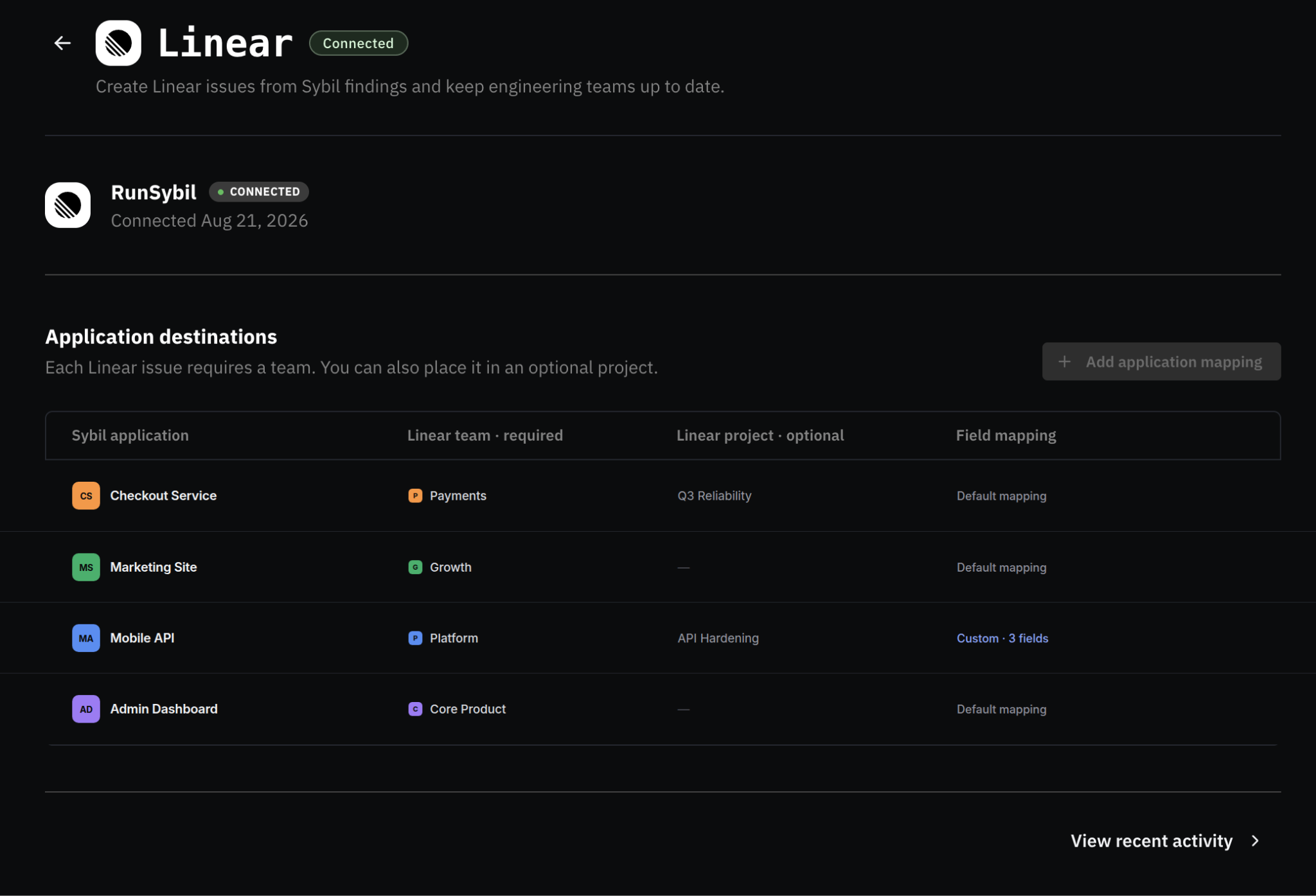
Setup lives under Settings → Integrations. It takes three steps:
- Authorize your Linear connection
- Pick a team (and optional project) for incoming findings
- Map Sybil’s fields, such as severity, description, and status. You also can leave anything unmapped to be handled manually
Since Linear doesn't have custom fields like other ticketing platforms, we leverage Linear's tags for things like severity so data stays queryable and filterable inside Linear itself. Every issue we create links back to the originating finding in Sybil, so anyone working the ticket only has to make one click back to see full evidence and reproduction steps.
What to Know About How Sync Works Today
This first version is push-only. Sybil automatically creates and updates Linear issues, laying the foundation for full two-way status sync in an upcoming release. Closing a ticket in Linear leaves the finding open in Sybil until a re-test confirms the fix.
A quick note about visibility: once a finding pushes to Linear, anyone with access to that project can view its details, including severity, evidence, and reproduction steps. That's standard for any ticketing integration, but helpful to keep in mind as you map your data.
Why We Built This
Connecting findings directly to ticketing tools was one of our most requested features this year, and working with Linear was at the top of that list. Eliminating manual copy-pasting removes friction and speeds up fixes, while increasing reporting and visibility. That made prioritizing this integration an easy call.
What's Coming Down the Road
Jira and GitHub Issues integrations are shipping in the same update using the same setup pattern: connect your account, choose a destination, and map your fields once. Longer term, we're building toward ticket import and bidirectional status sync, so closing a ticket in your tracker automatically reflects in Sybil.
For our more general product roadmap, check out our monthly changelog. You can catch up on the most recent updates in the August edition.
Try it
If you're already a RunSybil customer, you can connect Linear today under Settings → Integrations. If you're evaluating RunSybil and this is on your checklist, reach out and we'll walk you through it.



Subscribe to RunSybil Blog
A weekly newsletter covering stories, techniques, guides and the latest product innovations coming.