

Introducing Continuous Coverage: Test Every Change with Sybil


In the last week, your team has merged hundreds of PRs, rebuilt the billing flow, and shipped untested endpoints.
AI-assisted development has made that pace the new normal, and a pentest once or twice a year can’t keep up. Worse, scanners are noisy, leaving you buried in triage. Even then, finding vulnerabilities is only half the job. Someone still has to fix them.
Today we are announcing Continuous Coverage to solve this disconnect. Instead of treating security testing as an isolated event that happens once a quarter, or worse, once or twice a year, RunSybil is turning testing into an automated, continuous response to the code you ship.
With this new feature, which is available to all customers today, Sybil tests what changed, proves what’s actually exploitable, and helps you fix it. Connect your code or start from a URL. Continuous security testing works either way.
How Continuous Coverage Works
To start, Sybil maps your application end to end, including its endpoints, user roles, and data flows. Then it tests all of it, creating a baseline. Sybil learns how your app works, and every subsequent test builds on that knowledge instead of starting from zero.
Automated scoping guides setup. Sybil helps you identify what should be in scope so testing focuses on real risk, skips the noise, and never touches assets you didn’t mean to include. Continuous Coverage works in black-box testing, white-box testing, or both.
From there, every cycle runs the same loop:
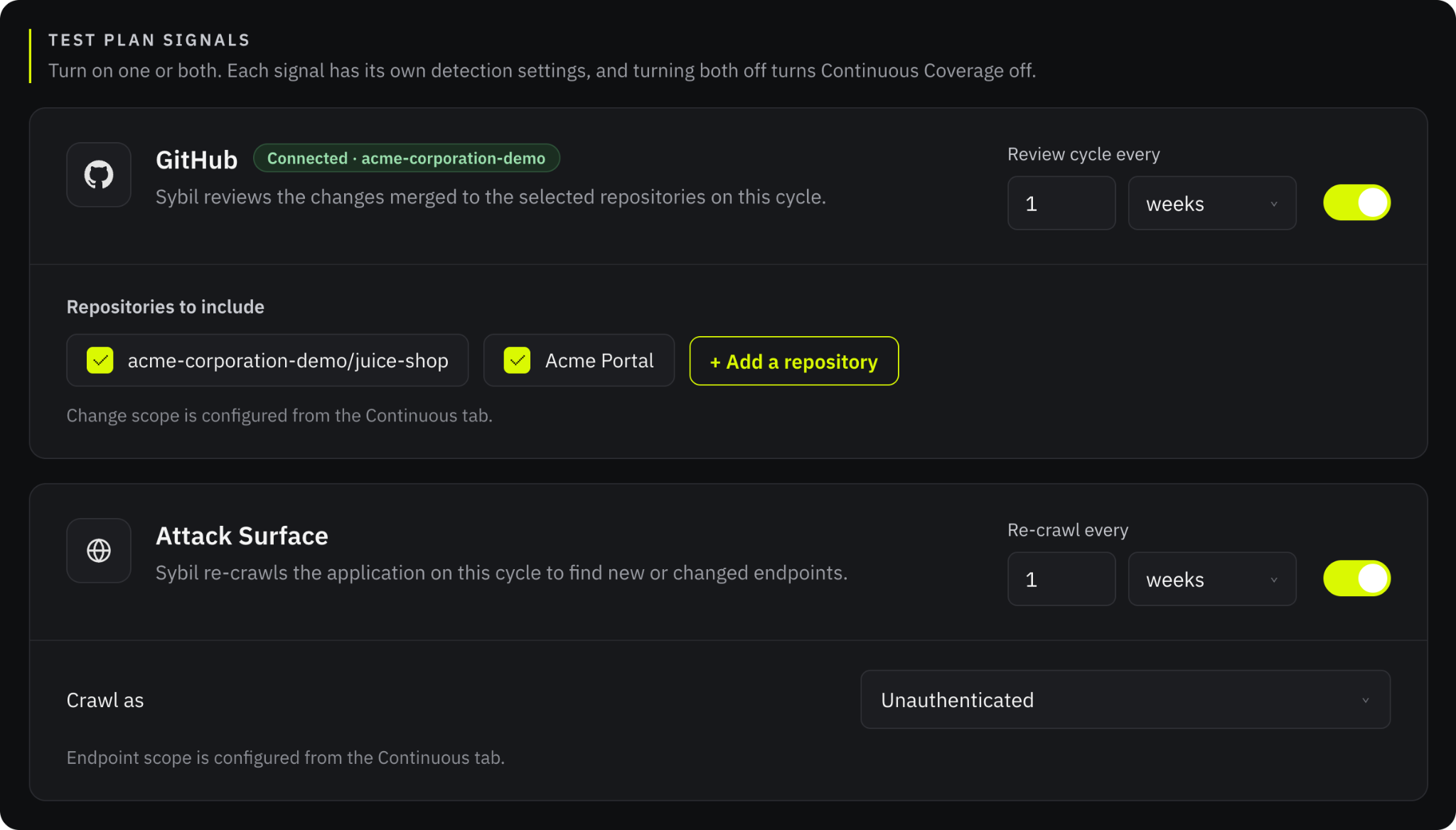
- Detect: As often as daily, Sybil reads code merged in GitHub, re-crawls your live app for new and changed endpoints, or a combination of the two.
- Plan: Sybil groups what changed by the part of the app it affects, like billing or team permissions. It also ranks each area by risk, and explains why it’s worth testing.
- Test: On your cadence, Sybil rolls every change since the last run into a single test. You approve it first or let it run automatically. Every finding is validated as exploitable before it reaches you, so you get a short list of real issues, not a backlog of maybes.
- Fix: Findings go to Linear, Jira, or GitHub Issues with remediation guidance. For white-box apps, with just a click of a button, Sybil can also open a pull request with the fix. Your team reviews and merges it, clicks Retest, and Sybil confirms the fix in under an hour.
Detection and testing run on separate schedules. Sybil can check for changes every day without kicking off a test, and nothing found in between gets dropped. It all rolls into the next test.
Black Box or White Box: You Choose
Black Box: The Attack Surface Signal
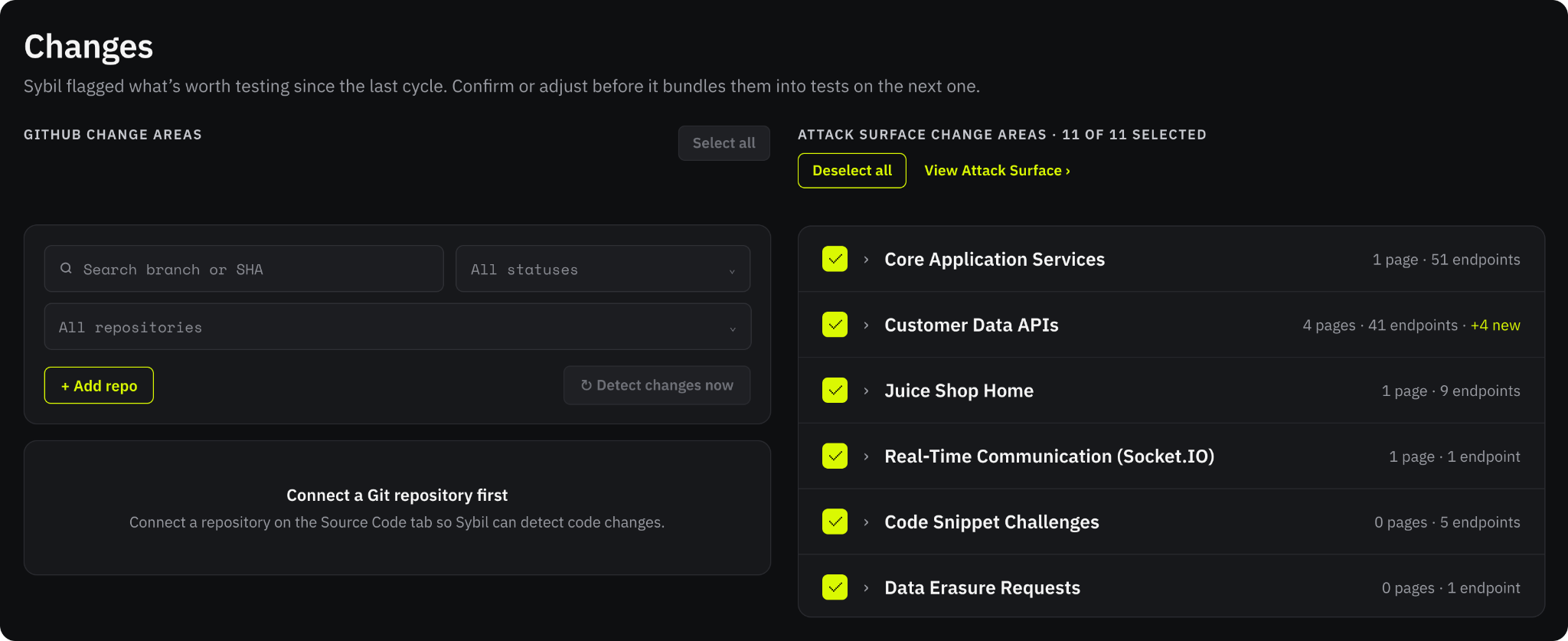
With the Attack Surface signal, Sybil re-crawls your application on the interval you choose, signed in as one of your test accounts or unauthenticated, and compares the result with the previous crawl. Sybil groups new endpoints by area of the application and marks each area with a count of what’s new, so you can see exactly how your attack surface has changed. You choose which areas, pages, and endpoints go into the next test.
This is how an attacker first meets your application: they see what is reachable, and they notice what’s new. The Attack Surface signal continuously gives your team that same view, without any code access, and Sybil tests what changed inside the scope you approved.
White Box: The GitHub Signal
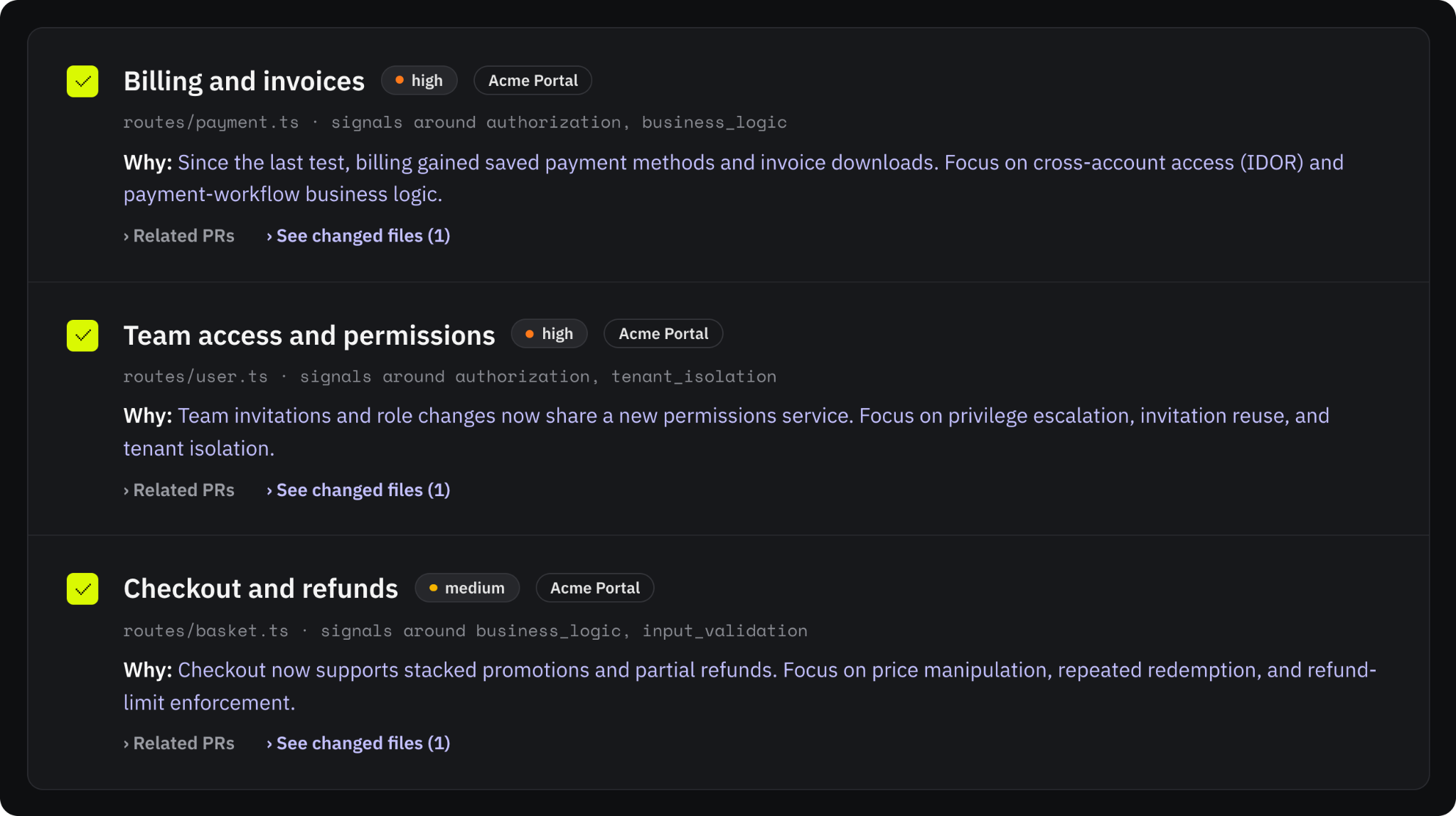
With the GitHub signal, Sybil reads every commit merged since it last tested a branch, along with the code around it. Sybil tracks changes across customer-facing surfaces, including new endpoints, authentication and permission logic, and data flows, weighing each one against the access checks and trust boundaries in your code.
Sybil groups what it finds into change areas. Each area has a risk level from low to critical, a short explanation of what changed and how it could be exposed, and the changed files behind it. When nothing in a set of changes affects security, Sybil says so and explains why.
Code isn’t the only context Sybil can use. The Knowledge Base holds what code doesn’t spell out: architecture notes, business rules, trust boundaries and known constraints. Write entries in Sybil, or connect Notion to import the pages you share with Sybil. Sybil’s testing agents search the Knowledge Base. For example, when testing a billing update, an agent checks your documented rules for which users are authorized to view specific invoices.
Which Signal to Use
The two signals see different things. A re-crawl finds new pages and endpoints the way an outsider would, but it can’t see a permission check that changed behind an endpoint that already existed. A diff can. Teams that connect code get both views. Teams that can’t share code still get continuous coverage of the attack surface an attacker would see first.
Set Your Cadence
Continuous Coverage separates looking for changes from testing them:
- Signal checks: Sybil checks your repositories and re-crawls your attack surface on intervals you set, from every day to once a month. A check updates the Continuous tab. It doesn’t start a test.
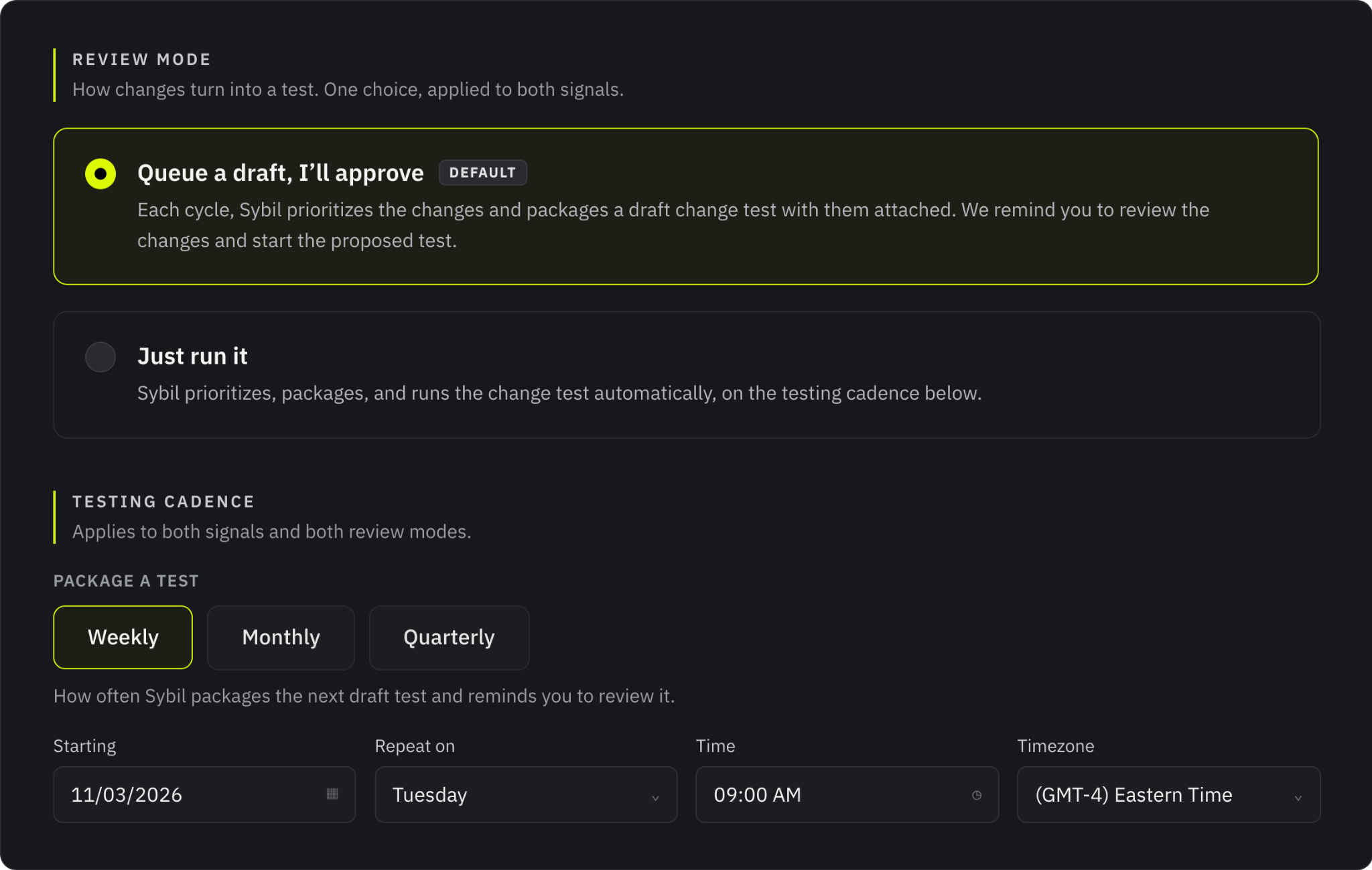
- Testing cadence: Testing is done on your schedule, starting on the date, time, and timezone you choose. In each cycle, Sybil packages the changes you selected into one test. You also can set up blackout testing dates.
When something can’t wait, users can manually resync GitHub changes and run a test ahead of schedule. If a draft is still waiting for review when new changes arrive, Sybil adds them to that draft instead of starting another one. Coverage can be as predictable or ad-hoc as your team needs. Schedule recurring tests, trigger an immediate check for a high-priority enterprise fix, or switch between the two whenever priorities shift.
You Stay in Control
Automatic testing only helps if you trust what it will do. Continuous Coverage has two review modes:
- Queue a draft, I’ll approve: Sybil packages each cycle’s test as a draft and notifies you. Nothing runs until someone on your team reviews it and starts it. This is the default.
- Just run it: Sybil packages the test and starts it automatically.
In either mode, you can deselect any change area, exclude whole repositories, and edit the test’s focus areas before it runs. A recommendation tells Sybil where to focus, but it never widens what Sybil is allowed to test. Every team handles human oversight differently. Sybil lets you customize exactly where actions pause for human review and where they run hands-off, keeping testing as gated or automated as you want.
Continuous Coverage tests run through the same pipeline as every other Sybil test. They stay inside your configured scope and your organization’s test limits, pause outside the set testing windows, and reuse the accounts you approved for your baseline test.
Every cycle is logged for auditing, including its approval status and detected risks, like "3 changes worth testing: 1 high, 2 medium.”
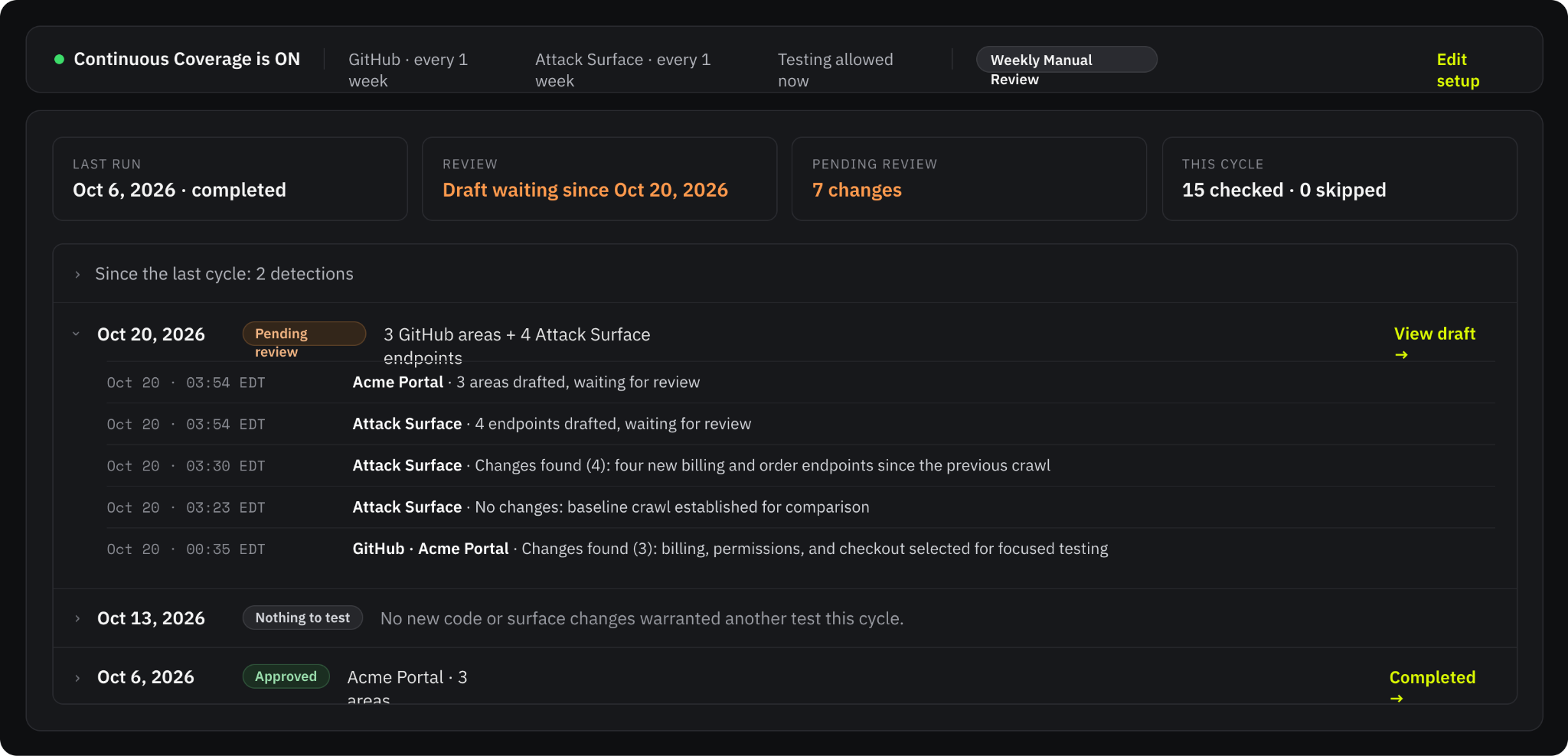
See What’s Changing in Your Applications
For existing teams: Continuous Coverage is live today. Navigate to the Continuous tab on any application with a completed baseline test to set your cadence and review mode.
For new teams: If you are ready to test your application, setup takes less than an afternoon. Schedule a demo.
FAQ
How do I get started with Continuous Coverage?
With a subscription, Continuous Coverage kicks off by evaluating the application broadly, with no specific focus areas (besides scope limits defined by the user). Continuous Coverage uses that information as the baseline and reuses its accounts, source code, and knowledge base.
Do I need to connect source code?
No. The Attack Surface signal re-crawls your application and finds new endpoints without any code access. Connecting a repository adds the GitHub signal and its diff-based recommendations.
Can Sybil change our code or open pull requests?
Only with human approval. Code analysis for Continuous Coverage is read-only. Sybil can’t automatically write files or run anything in your repositories.
Can Sybil test something we didn’t approve?
No. Continuous Coverage tests use your configured scope and the accounts from your baseline test. Recommendations only decide where Sybil focuses inside that scope.
Can we review tests before they run?
Yes. Choose Queue a draft, I’ll Approve It, and every cycle waits for your sign-off. You can also deselect individual change areas before Sybil packages and begins the test.

.png)
Subscribe to RunSybil Blog
A weekly newsletter covering stories, techniques, guides and the latest product innovations coming.