

RunSybil Changelog: November 2026


You ship every day, so security testing once a year leaves you exposed. This month, Sybil starts testing your applications as they change. And when an issue surfaces, our new remediation tools take a verified finding from proof to pull request instantly.
Spotlight Feature: Continuous Coverage
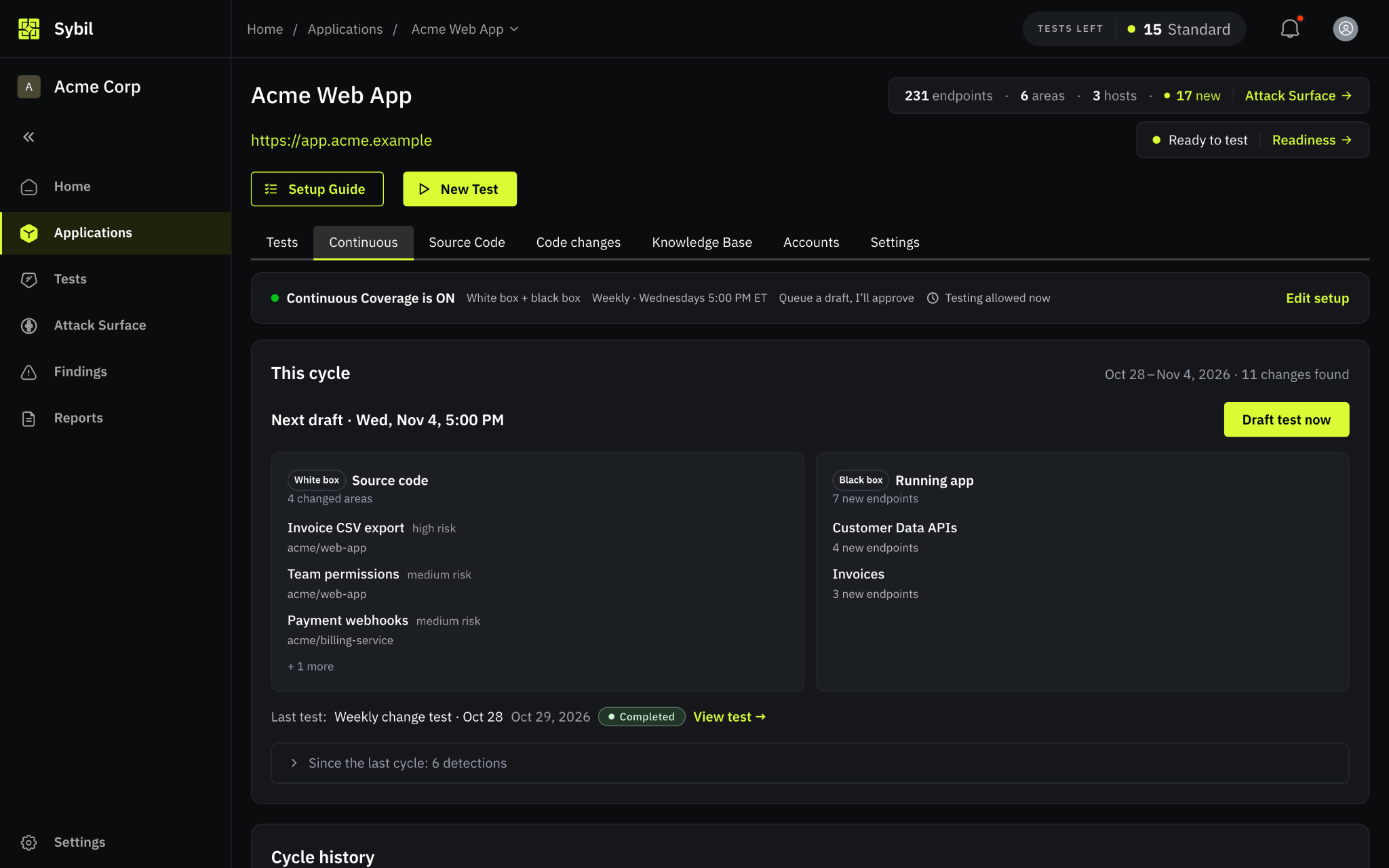
Continuous Coverage makes security testing a standing response to the code you ship. It starts from a completed baseline test: Sybil maps your application's endpoints, user roles, and data flows. Every later test builds on what Sybil already learned. From there, each cycle runs the same loop:
- Detect: As often as daily, Sybil checks for changes.
- The Black-box: Running app signal re-crawls your application and compares it with the last crawl.
- The White-box: Source code signal reads code merged in your connected repositories. Use either signal or both.
- Plan: Sybil groups what changed by the part of the application it affects, such as billing or team permissions. It also rates each area's risk and explains why it is worth testing.
- Test: On your testing cadence, Sybil rolls every change since the last cycle into one test.
- Choose ‘Queue a draft, I'll approve’ to review each test before it starts.
- You also can choose ‘Just run it’ to start it automatically.
- Fix: Validated findings go to Jira, Linear, or GitHub Issues with remediation guidance.
Detection and testing run on separate schedules, so a daily check never starts a test on its own. Changes found between cycles roll into the next test.
Every Continuous Coverage test stays inside your configured scope and test allowance. It also reuses the accounts from your baseline test.
Additional features:
- Continuous Coverage on Home: The Home page shows each application's signals, its last and next cycle, as well as any draft waiting for your review.
- Cycle History: Every cycle records the time period it covered and the test it started.
- Review Reminders: Sybil notifies you when a drafted test is waiting for your review.
To get started, open the Continuous tab on any application with a completed baseline test, then choose your signals, cadence, and review mode.
Suggested Patches and One-Click Pull Requests
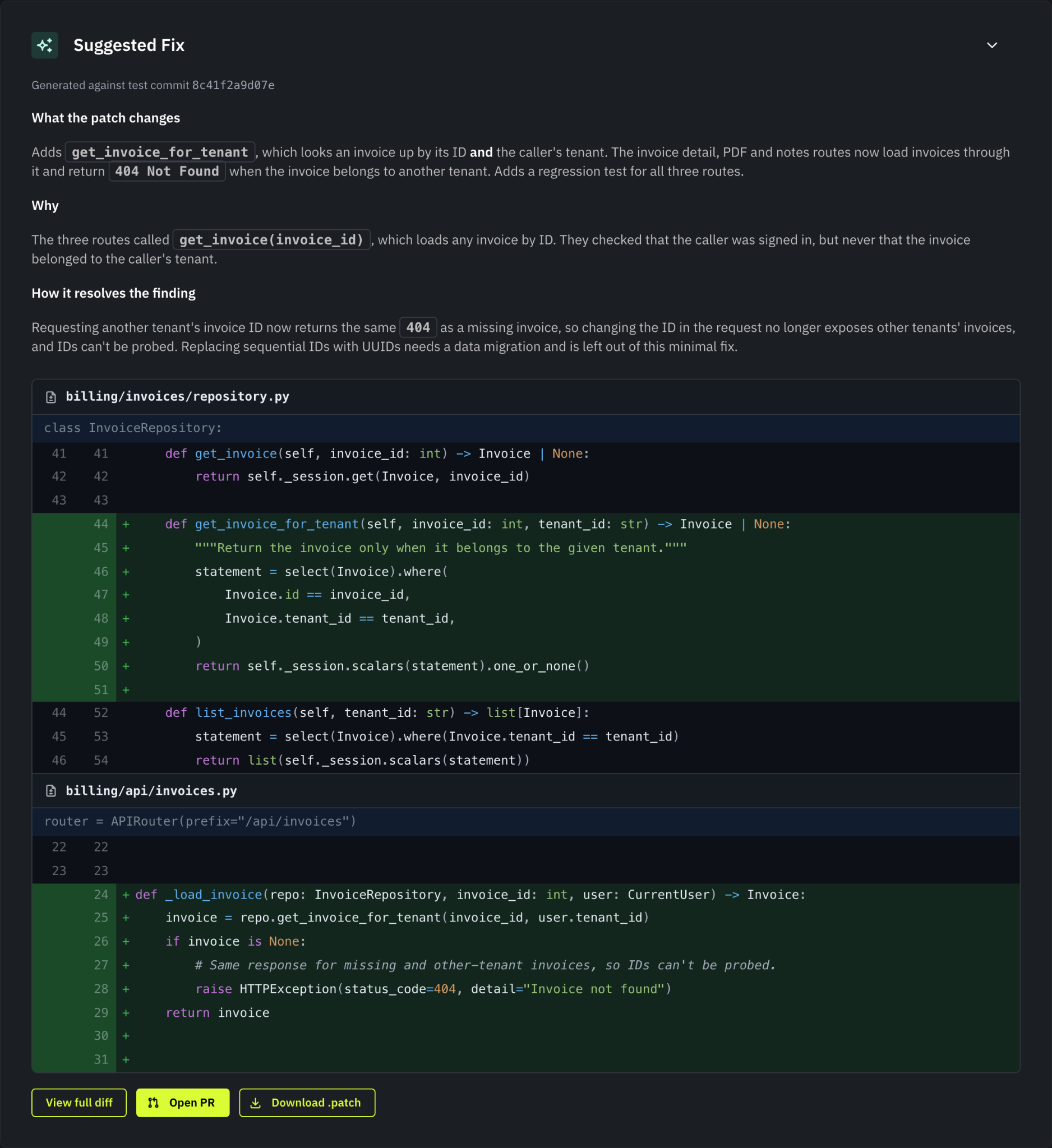
Finding a vulnerability is only half the job. In October, we further enhanced our remediation features. Open a finding to see its Suggested Fix: the change, and Sybil's reasoning for it.
If your repository is connected through the Sybil GitHub App with write access, click Open PR and Sybil opens a pull request with the patch. Your team reviews and merges it through your normal process. Then click Retest. When the retest confirms the issue is gone, Sybil marks the finding Fixed.
Patches can also travel with your tickets. In an application's Linear or Jira field mapping, set Suggested patch to append the patch to the issue description, or send it to a Jira custom text field. It's off by default.
Edit Findings in Place, With a Full History
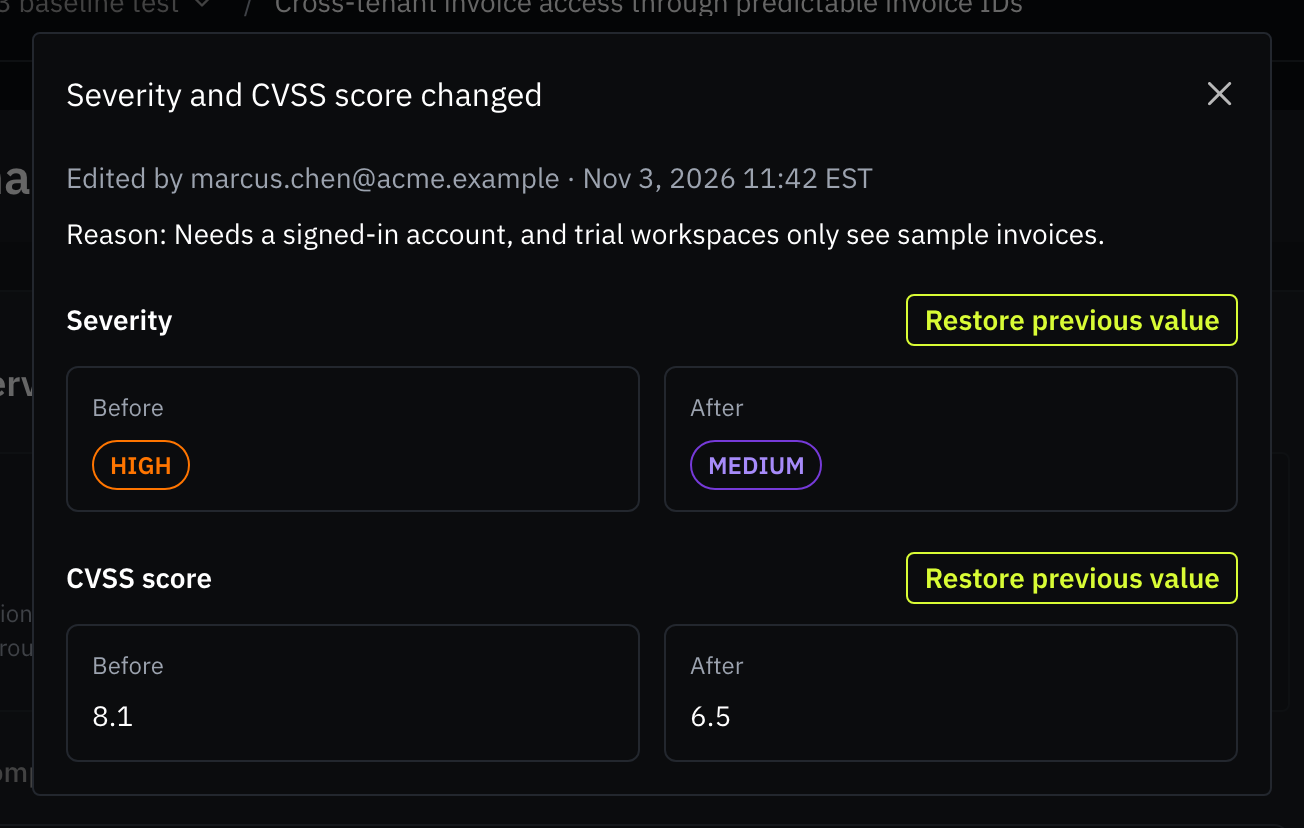
Your team knows your application best, so you now can correct a finding right where you read it. Edit the title, severity, CVSS score, CWE, and narrative sections in place, and change the status. The CWE editor searches the full CWE catalog. A reason is required when downgrading a severity, or marking a finding as False positive or Won't fix.
Every change is recorded, including any that Sybil makes. A finding's history shows who changed what, the earlier value, and any reason given. If an edit was a mistake, you can restore the previous value from the history.
See Which Applications are Ready to Test
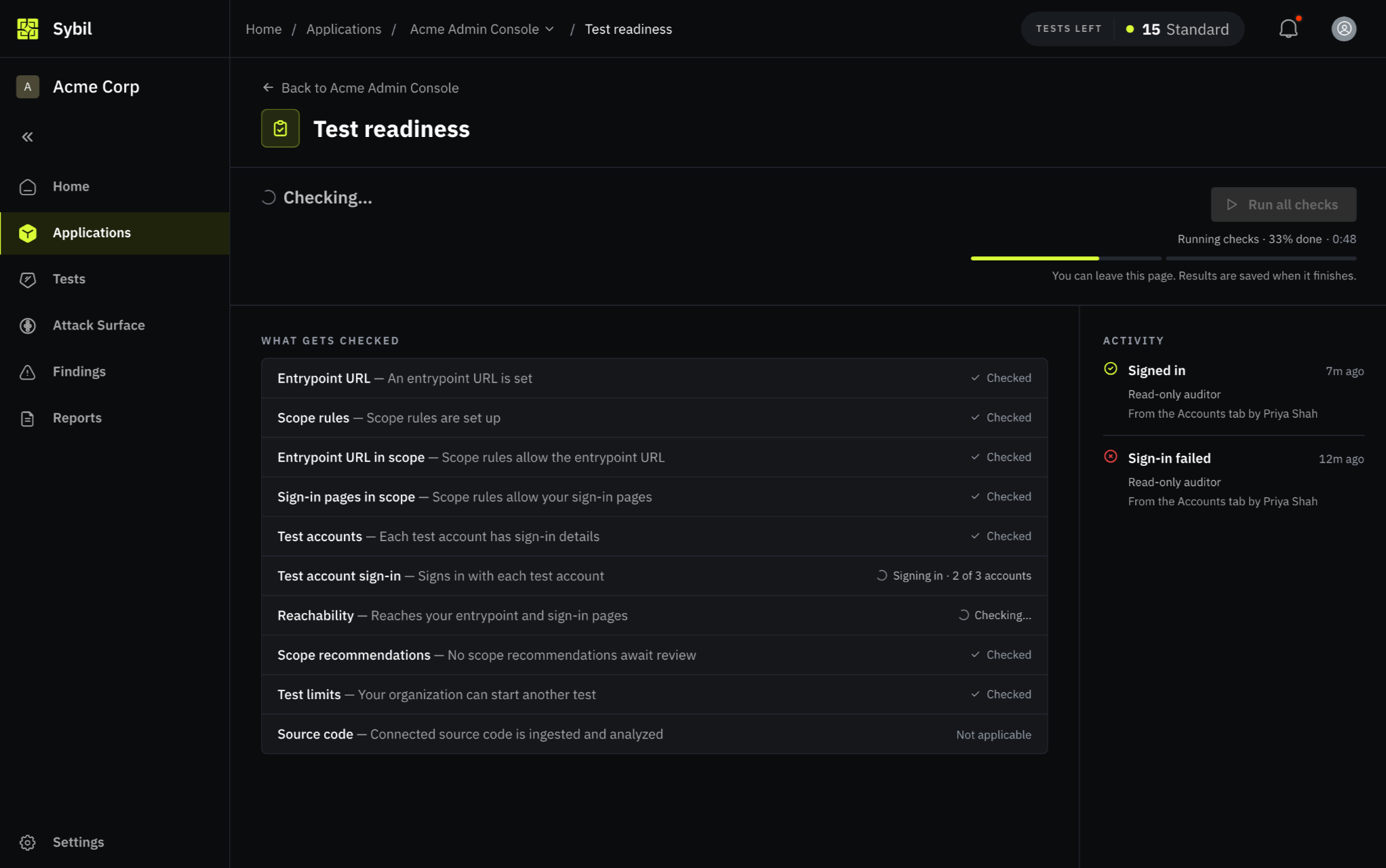
A test can only cover what Sybil can access and reach. If a test account can't sign in, or part of your application isn't reachable, Sybil can't test what sits behind it. Setup checks now appear directly in your test configuration, showing exactly what needs addressing.
- At a Glance: Track application readiness across both Home and the Applications list. A new Setup Check column shows whether an app is Ready to test, Not ready with the number of issues to fix, Needs review, or Not checked. To verify status on demand, select and run readiness checks directly in the UI.
- Where you Start Tests: Both the setup guide and the Review step of New Test show the application's readiness, allowing you to run a readiness check on the spot. These checks are purely advisory and will never block a test from starting.
- What Changed a Result: The test readiness page's new Activity panel lists every readiness run. It also tracks sign-ins and reachability checks from outside a run, such as a teammate re-authenticating an account from the Accounts tab or an active test signing in. A Current result badge marks where each result came from.
- Over the API: Application readiness in the public API now also returns advisories, such as test accounts that can't sign in, missing scope rules, or source code that failed to process.
More Updates and Enhancements
- Delete Canceled or Failed Tests: Remove a test you canceled by mistake from its test page. Deleting a test doesn't return it to your allowance.
- Large Source Code Uploads: Multi-gigabyte archives upload directly from your browser with live progress. You now can upload .tar.gz archives, and an archive can hold up to 1 million files.
- Testing Windows: Set allowed hours and outage dates for an application or your whole organization. Tests automatically pause outside those windows, and each test page shows its pause and resume history. Retests canceled by a window do not count toward your retest limits.
- Larger Knowledge Base Documents: Knowledge Base entries now can hold up to 1 million characters, and you can fill one from a Markdown file.
Coming Up on Our Roadmap
- Vulnerability Disclosure Program: Using Sybil, we will validate findings submitted by ethical hackers through a portal hosted on your behalf.
- Choose Your Test's Source IP: Continuing our egress work, you'll be able to pick which source IP a test sends traffic from. This is rolling out to select organizations now.
- Enterprise SSO: Federated single sign-on is close. Your IT admin will connect your identity provider from a setup link we send, and your team will sign in through an organization-specific link.
- Test Directions: Send directions to a running test. For instance, you’ll be able to give it specific areas to focus on and see how Sybil handled each direction. If you're interested in early access to this ability, reach out to your customer success manager.
Wrapping Up
That's all for this month. We hope these updates make your experience with RunSybil even better. As always, your feedback is what drives our roadmap. If you have any suggestions, questions, or just want to say hi, feel free to reach out.
FAQ
Recent product questions we want to surface:
1. Do I need to connect source code to use Continuous Coverage?
No. The Black-box: Running app signal re-crawls your application and finds new and changed endpoints without any code access. Connecting a repository adds the White-box: Source code signal, which reads merged changes and can catch a change behind an endpoint that already existed, such as a modified permission check.
2. Can Sybil change our code?
Only through a pull request that someone on your team requests. Sybil opens a pull request when a person clicks Open PR on a finding, and your team decides whether to merge it. Continuous Coverage reads your code and never writes to it.
3. Will Continuous Coverage test anything we didn't approve?
No. Continuous Coverage tests use your configured scope and the accounts from your baseline test. Change areas and recommendations decide where Sybil focuses inside that scope, and nothing outside it.
4. Can my team correct a finding Sybil reported?
Yes. Edit a finding's title, severity, CVSS score, CWE, status, and narrative in place. A finding's history tracks every change, who made it, and the reason provided. You can restore earlier values at any time.


Subscribe to RunSybil Blog
A weekly newsletter covering stories, techniques, guides and the latest product innovations coming.